Alright let’s kickstart this blog with something really simple and fast 🙂
SO… when doing correctives, limb stretching or any kind of setup we need to be able to measure distances between points, right? I’m going to share how I’ve been doing it since forever. I’m actually proud of this one since it was one of the first “techniques” I discovered myself when I started rigging without being told or following tutorials.
STEP 1
You’re going to create 2 empty transforms (groups) and 1 distanceBetween node.
Name them however you want to make things clear. I usually name them:
“(name of what I’m measuring)_start“
“(name of what I’m measuring)_end“

To create a distanceBetween node just write it on the node editor or use a command:createNode distanceBetweencmds.createNode( 'distanceBetween' )
STEP 2
Connect the .translate attributes of both groups into the distanceBetween .input attributes.

STEP 3
Select both transforms and hit Ctrl+G to group, rename it.

STEP 4
Do a scaleConstraint of the master/global/SRT control of your rig. You know, the one you use to move around and scale the entire character.
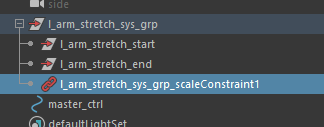
PROFIT
And now were done! Do pointConstraints in the start and end transforms to whatever you’re trying to measure the distance. (for example to the elbow and wrist controllers)
Now you can safely use the distanceBetween.distance attribute to drive stretching or correctives as you need to. Since the parent group where both transforms are located is constrained to the master_ctrl space, the distance value will always be reliable and you don’t need to compensate anything when scaling, since the translate values will be the same. In another words, the scale constraint
That works even in non-uniform scaling… don’t believe me? Scale the master_ctrl using any combination of sx, sy, sz and track the value of the distanceBetween.distance. Just keep this setup as simple as possible in a separate location of the moveable rig and you should be safe. 🙂
Happy measuring!
 RIJAH'S BLOG